Amazon Elastic Compute Cloud Amazon Ec2
K
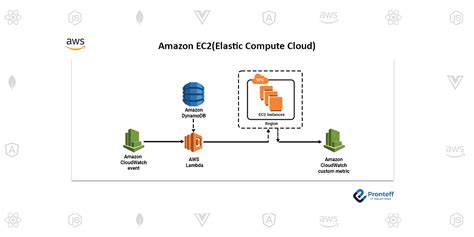
Amazon Elastic Compute Cloud Amazon Ec2 Amazon Elastic Compute Cloud Amazon EC2 Powering the Clouds Infrastructure Amazon EC2 Elastic Compute Cloud is the workhorse of Amazon Web Services AWS providing ondemand computing capacity to millions of customers worldwide Its the foundational service for running virtually any application or workload in the cloud This comprehensive guide dives deep into Amazon EC2 exploring its functionality benefits and practical applications Understanding Amazon EC2 A Deep Dive Amazon EC2 allows users to provision virtual servers instances on demand scaling up or down as needed This elasticity is critical in modern computing environments where application demands fluctuate significantly Think of it as renting a server from Amazon but with the flexibility to instantly adjust its size and power based on your requirements Key Components of EC2 Instances These are virtual servers running various operating systems eg Linux Windows Instance types vary widely in terms of CPU memory storage and networking capabilities catering to diverse needs Choosing the right instance type is crucial for optimal performance and costeffectiveness Security Groups These virtual firewalls control inbound and outbound network traffic to instances enhancing security by defining specific rules and permissions Elastic Block Store EBS This provides persistent blocklevel storage for EC2 instances Users can configure EBS volumes with varying performance characteristics Amazon Machine Images AMIs Preconfigured templates of operating systems and applications enabling quick instance deployment AMIs streamline the setup process offering readytouse environments Instance Types A Spectrum of Options EC2 instances come in various configurations tailored for different workloads The choice depends on factors like CPU cores memory capacity storage and networking requirements A comprehensive understanding of instance families eg General Purpose Compute Optimized Memory Optimized and their respective strengths is key to achieving optimal resource allocation 2 Benefits of Utilizing Amazon EC2 Scalability Effortlessly adjust resources CPU memory to match demand Costeffectiveness Pay only for the compute capacity you use Flexibility Choose from various instance types and operating systems to suit your applications requirements Reliability Leverage AWS infrastructure for high availability and fault tolerance Security Strong security features like security groups and encryption to protect your data Ease of Use Simple management tools and APIs for seamless integration with other AWS services Practical Applications of Amazon EC2 EC2 isnt just for big companies its a powerful tool for diverse use cases Web Servers Hosting dynamic websites and web applications Databases Running relational or NoSQL databases Data Warehousing Processing and analyzing massive datasets Machine Learning Training and deploying machine learning models DevTest Environments Creating costeffective and flexible test environments Example Use Case A Startups Data Analysis Pipeline A young data analysis startup required a scalable platform for processing large datasets They chose EC2 instances optimized for compute performance By using autoscaling groups they dynamically adjusted resources based on incoming data ensuring seamless processing and efficient cost management This allowed them to focus on their core business without worrying about infrastructure overhead Expert FAQs 1 Q What are the key differences between different EC2 instance types A Instance types are differentiated by factors like CPU architecture memory network bandwidth and storage options each optimized for specific workload requirements 2 Q How can I ensure the security of my EC2 instances A Utilize security groups to control inbound and outbound traffic Employ strong passwords encrypt data at rest and in transit and regularly monitor your instance logs 3 Q How does Amazon EC2 differ from other cloud computing providers A AWSs vast ecosystem of services and mature infrastructure differentiates EC2 However each provider offers unique strengths and weaknesses so thorough evaluation is 3 crucial 4 Q What are the potential challenges in deploying complex applications on EC2 A Proper configuration resource management and monitoring are crucial to smooth operation Complex applications might require significant upfront planning and testing 5 Q How can startups leverage Amazon EC2 effectively A Startups can use EC2s scalability to handle fluctuating workloads reducing upfront infrastructure investment and focusing on core product development Conclusion Amazon EC2 empowers developers and businesses with unparalleled agility and scalability Understanding its features benefits and nuances allows optimal utilization leading to cost savings efficient resource management and improved application performance Its versatility caters to a wide array of applications from simple web servers to complex data processing pipelines As cloud computing continues to evolve EC2 will undoubtedly remain a cornerstone of this technology revolution Unlocking the Power of Amazon EC2 Your Guide to Cloud Computing Navigating the cloud can feel daunting but Amazon Elastic Compute Cloud Amazon EC2 is a powerful tool that demystifies the process In this blog post well explore the intricacies of Amazon EC2 offering practical guidance for both beginners and seasoned cloud users Well delve into what EC2 is how it works and why its a gamechanger for businesses of all sizes What is Amazon EC2 Amazon EC2 or Elastic Compute Cloud is a web service that lets you provision servers on demand Think of it as renting virtual machines in the cloud Instead of investing in and managing physical servers you leverage EC2s flexibility to spin up and scale resources as your needs change This payasyougo model is a significant advantage saving you money and allowing for quick adaptations to fluctuating workloads How Does EC2 Work EC2 functions by offering various instance types These virtual machines VMs come in 4 different configurations ranging from basic web servers to highperformance computing HPC instances You can choose the specifications that best align with your applications requirements considering factors like CPU power memory storage capacity and operating systems Example Scaling a Website During Peak Traffic Imagine your ecommerce website experiences a surge in traffic during the holiday season With Amazon EC2 you can easily scale your web servers up You simply provision more EC2 instances automatically distributing the load As the traffic subsides you can scale down minimizing costs This elasticity is a key benefit of using EC2 How to Get Started with EC2 1 Create an AWS Account If you dont already have one sign up for an AWS account The setup is straightforward 2 Choose an Instance Type Evaluate your applications needs and select the appropriate instance type from Amazons offerings 3 Configure Security Groups Establish security rules to control network traffic to your EC2 instances This is crucial for security 4 Launch the Instance Initiate the launch process specifying the desired instance type and configuration 5 Connect and Configure After the instance is launched connect using SSH or other methods and configure it to your applications requirements Visual Representation Insert a simple diagram illustrating the flow of launching an EC2 instance highlighting the steps account creation instance selection security group configuration instance launch and configuration Beyond the Basics Advanced Features Amazon EC2 offers a wealth of features beyond basic instance creation These include Elastic Block Store EBS Provides persistent storage for your EC2 instances Amazon Machine Images AMIs Preconfigured images allowing for faster instance deployment Auto Scaling Automatically adjust the number of EC2 instances based on demand Load Balancing Distribute traffic across multiple EC2 instances 5 Example Auto Scaling a Database Application Imagine a database application Using Auto Scaling you can automatically add more database instances when the demand increases ensuring minimal downtime and maximum performance during peak hours RealWorld Applications of EC2 Web Servers Hosting websites and web applications Application Servers Running software applications Database Servers Storing and managing databases Big Data Processing Analyzing large datasets Conclusion Amazon EC2 empowers businesses to deploy and manage applications in the cloud effectively It offers scalability costefficiency and security features that are crucial in todays dynamic IT landscape By leveraging EC2s vast capabilities you can focus on your core business while benefiting from reliable and robust cloud infrastructure Frequently Asked Questions FAQs 1 What are the different types of EC2 instances available Detailed explanation of the different instance types and their use cases 2 How much does EC2 cost Explanation of the payasyougo pricing model examples of costs and tips for cost optimization 3 What are the security considerations when using EC2 Discussion of security groups encryption and other security best practices 4 How can I manage my EC2 instances Description of the AWS Management Console and other tools for managing EC2 instances 5 Is EC2 suitable for all types of applications Explanation of different use cases and the suitability of EC2 across diverse application requirements This comprehensive guide provides a solid understanding of Amazon EC2 By exploring its features and following the practical examples youll be wellequipped to harness the power of the cloud for your business needs Remember to delve deeper into specific areas based on your projects requirements Happy cloud computing 6